Getting Started with Sims 4 Kitchen Decor
Transforming your Sims 4 kitchen into a stylish and functional space can be a rewarding experience. Whether you’re a seasoned builder or a newcomer to the game, the possibilities for kitchen decor are vast and exciting. This guide will walk you through the essentials, from choosing the right style and color palette to incorporating mods that expand your decorating options. By following these steps, you’ll be well on your way to creating a kitchen that reflects your Sims’ personalities and enhances their culinary adventures. Remember, the key is to experiment, have fun, and let your creativity flow. The perfect kitchen is waiting to be designed.
Choosing Kitchen Styles in Sims 4
The Sims 4 offers a diverse range of kitchen styles to suit every taste. From sleek and minimalist modern designs to cozy and rustic farmhouse aesthetics, the game provides numerous options to get you started. Consider the overall theme of your Sims’ home and how the kitchen fits into that vision. Do you envision a bright and airy space or a more intimate and traditional setting? Researching different kitchen styles online, such as Scandinavian, industrial, or bohemian, can provide inspiration and help you define your decorating goals. Explore the pre-built kitchens in the game to get a sense of available furniture and decor. This will guide your initial design decisions, helping you establish a cohesive and visually appealing space.
Modern Kitchen Design

Modern kitchens are characterized by clean lines, minimalist decor, and a focus on functionality. They often feature sleek cabinetry, stainless steel appliances, and neutral color palettes. To achieve a modern look, prioritize simple shapes and avoid excessive ornamentation. Integrated appliances, such as built-in refrigerators and dishwashers, can create a streamlined aesthetic. Consider using materials like glass, metal, and high-gloss finishes to enhance the contemporary feel. Open shelving and island counters are staples. These design elements provide ample storage and workspace, while also contributing to the kitchen’s sleek, modern vibe. Remember, less is often more in modern design; each element should serve a purpose.
Selecting Color Palettes
Choosing the right color palette is crucial for setting the mood and ambiance of your Sims 4 kitchen. Start by selecting a primary color that will dominate the space, such as white, gray, or a soft pastel. Then, add accent colors to introduce visual interest and personality. Consider the overall feel you want to create. Bright colors, like yellows and oranges, can energize the space, while cooler tones, such as blues and greens, promote a sense of calm. Use the color wheel to find complementary or analogous color combinations. Avoid using too many colors, which can make the space feel cluttered. Instead, stick to a few carefully selected hues that complement each other and enhance the overall design. Don’t forget to consider the flooring and the appliances!
Using Appliances
Appliances are essential to any Sims 4 kitchen, offering both functionality and aesthetic appeal. The Sims 4 provides a wide range of appliances, from basic refrigerators and stoves to high-end dishwashers and microwaves. When selecting appliances, consider their style and how they fit into your overall kitchen design. Stainless steel appliances are a popular choice for modern kitchens, while retro-style appliances can add a touch of vintage charm. Pay attention to the size and placement of appliances to ensure they fit comfortably in your kitchen layout and are easily accessible. Many mods offer custom appliances with unique designs and functionalities, expanding your creative possibilities. Consider the Sims’ needs and preferences when making appliance choices.
Customizing Countertops and Cabinets

Countertops and cabinets are key elements of kitchen decor, providing both storage and workspace. The Sims 4 offers a variety of countertops, including granite, marble, and wood. Cabinet options range from traditional to modern styles. Experiment with different materials, colors, and finishes to create a cohesive look. Customizing the cabinets and countertops allows you to personalize the kitchen to match your Sims’ tastes. Using mods can greatly expand these options, providing access to unique cabinet designs, custom countertop materials, and even open shelving. Pay close attention to the textures and details, to make the space look realistic. Matching the countertops with the cabinets, or choosing contrasting colors, helps to create a sense of style and harmony within the room.
Decorating with Wall Art and Accessories
Wall art and accessories add personality and charm to any kitchen. Choose artwork that complements the overall style of your kitchen, whether it’s abstract paintings, framed prints, or decorative plates. Accessories, such as vases, cookbooks, and kitchen utensils, can fill up empty spaces and contribute to a cozy atmosphere. Be mindful of the size and placement of these items, avoiding clutter while still adding visual interest. Use open shelves or countertop space to display your favorite items, adding a personal touch to the kitchen. Experiment with different textures and materials, such as wood, metal, and ceramic, to create a layered and visually appealing space.
Wall Decorations
Wall decorations can instantly transform the look of a kitchen. Consider adding a gallery wall featuring various prints and photos, or opt for a single, large statement piece. Mirrors can make the space appear larger and brighter, while also adding a touch of elegance. Choose artwork that reflects your Sims’ interests and personality. Consider using themed decor to match the overall kitchen style. The use of wall decorations allows for customization, allowing the kitchen to feel more unique and suited to the characters. Remember that the overall style of wall decorations should complement the existing kitchen décor.
Floor and Lighting Options

Flooring and lighting play critical roles in kitchen design. Select flooring that is both aesthetically pleasing and practical, considering factors such as durability and ease of cleaning. Options include hardwood, tile, and linoleum. Layer lighting to create the desired ambiance. Use overhead lights for general illumination, task lighting above the countertops and stovetop, and ambient lighting to soften the space. Consider using recessed lighting, pendant lights, or under-cabinet lighting. Lighting is a huge opportunity for creativity. Use light fixtures that match the overall theme of your kitchen. Combining different types of lighting, with a variety of color temperatures, enhances the overall experience.
Lighting
Lighting in the kitchen should provide both functionality and atmosphere. The use of multiple light sources, such as overhead lights, under-cabinet lighting, and pendant lights, is usually beneficial. Overhead lighting provides general illumination, while task lighting focuses on areas such as countertops and the stovetop. Ambient lighting can add warmth and create a more inviting space. Select lighting fixtures that complement your kitchen’s style. Consider adding dimmers to adjust the lighting intensity based on the time of day or the activity. Experiment with different bulb colors and brightness levels to achieve the desired effect.
Adding Plants and Greenery
Adding plants and greenery brings life and freshness to your Sims 4 kitchen. Choose plants that are appropriate for the available space and light conditions. Herbs in pots can add both beauty and functionality, as they can be used in cooking. Consider adding a small herb garden on a windowsill or countertop. Larger plants can be placed on the floor or on shelves. Plants add color and texture, which can create a sense of warmth and serenity. Use decorative pots and planters to match the style of your kitchen. Regular maintenance, such as watering and pruning, is crucial to maintaining the plants’ health and appearance. Integrating plants into your kitchen décor helps create a more inviting and lively space.
Creating a Functional Kitchen Layout

A well-designed kitchen layout enhances functionality and workflow. The work triangle—the area between the sink, the stove, and the refrigerator—is a key concept in kitchen design. Ensure these elements are strategically placed for ease of use. Consider the amount of counter space available, making sure there is enough for food preparation and cooking. Ensure that there’s adequate storage space. If space is limited, opt for multi-functional furniture, such as a kitchen island with built-in storage or a dining table that can also be used for food preparation. Consider how your Sims will use the kitchen. Make it accessible and enjoyable for the whole family to use, in a practical and efficient manner.
Maximizing Space
Maximizing space is important, especially in smaller kitchens. Utilize vertical space by adding tall cabinets and open shelving. Use kitchen islands or peninsula counters to create more workspace and storage. Ensure that the walking paths are clear and unobstructed. Avoid clutter. Organize your cabinets and drawers to make the most of the available storage space. Consider adding pull-out drawers and organizers to make it easier to access items. Decluttering the kitchen and removing unnecessary items increases the overall usefulness of the space. Utilizing space-saving solutions, such as corner cabinets, adds functionality and efficiency to the kitchen.
Integrating with the Dining Area
Consider how your kitchen integrates with the dining area, as these spaces often blend seamlessly. Use similar design elements, such as matching flooring or color schemes, to create a sense of cohesion. Place the dining table close to the kitchen to improve convenience. Choose furniture that complements both spaces. Open-plan kitchens should flow into the dining area. Use the island as a transition area, that connects both parts. Maintain a clear view between the kitchen and the dining area to improve social interaction. Ensure there is enough space for movement and social interaction.
Utilizing Kitchen Mods

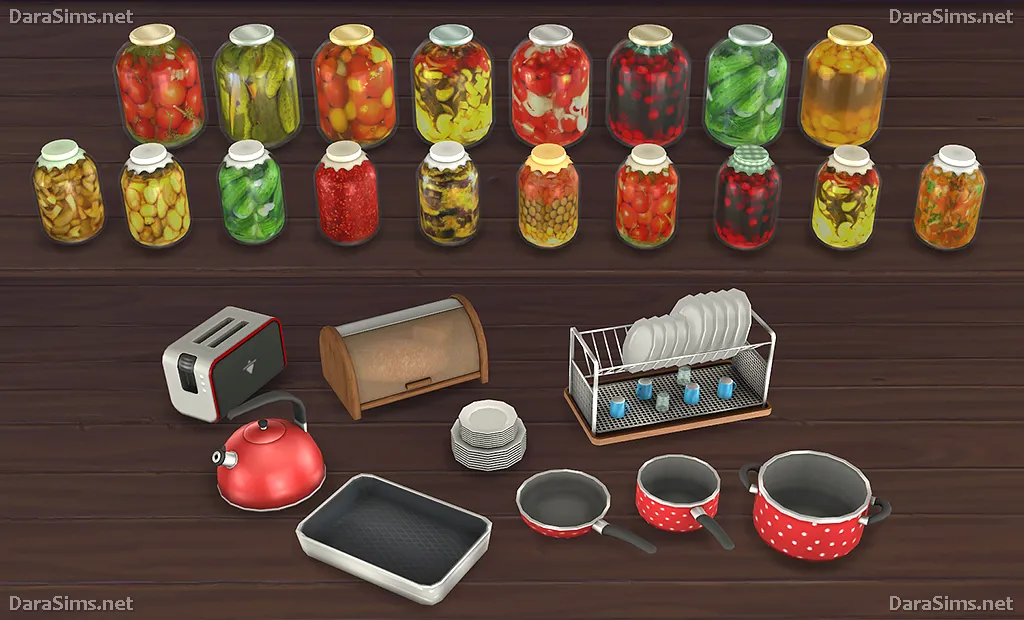
Mods are an invaluable resource for expanding the decorative possibilities in The Sims 4. Mods can add new furniture, appliances, and decor items that are not available in the base game. They give players the opportunity to customize their kitchen with unique, and interesting pieces. Mods can often provide detailed customization options, enabling players to match every element with their design vision. Consider installing mods that add specific styles, textures, or functionalities. Explore modding communities and websites. Always back up your game files before installing mods, and be mindful of the mod’s compatibility with the game version. Make use of mods to unleash your creativity.
Finding and Installing Mods
Finding and installing mods involves several steps. First, identify a reliable source for mods. Popular websites include The Sims Resource and ModTheSims. Once you’ve found a mod, download the file. Most mods come in a .package file format. Place these files in your Sims 4 Mods folder, located in your Documents/Electronic Arts/The Sims 4/Mods directory. Enable mods and custom content in your game settings, under ‘Other.’ It’s a good idea to test the mod in your game after installation. Keep in mind that mods can sometimes cause conflicts or affect the game’s performance. Be mindful when adding or removing mods, and update them as needed. Manage the mods and test them regularly to avoid potential issues.
Top Kitchen Decor Mods to Try
Several popular kitchen decor mods can enhance your game. These mods offer a vast array of design choices. Some mods focus on appliances, while others offer custom cabinetry. You can find mods for specific kitchen styles or themes. Experiment with different mods to find what works best. Always read the mod descriptions carefully, to understand the features and any compatibility issues. Be prepared to adjust your game, as mods are not always compatible. Discover the many possibilities that kitchen mods offer. Enhance your Sims’ kitchen by using custom content.